







 Home
Home Musics
 Videos
 Forum
Forum Apps
Apps
– Hello
Friends, WhatsApp is not a new application
for anyone and if I am not wrong it will replace
normal SMS application in coming time. WhatsApp is
an Mobile application that requires internet
connection to send and receive messages. Most of
the users want the same facility of WhatsApp on their
Computer as they spend more time on PC and not
texting on Mobile. We can use WhatsApp on
Computer using Bluestacks Software which worked
perfectly fine. The problem I found is Bluestacks
software is too heavy and it causes a lot of problems
in normal working of your system. So here comes the
post showing .
Two ways to install and use WhatsApp on PC

There are two methods that can be used to install
WhatsApp on PC without Bluestacks Software. Since
both of the ways don't use Bluestacks software you
can expect better performance of your system while
texting messages to your friends.
Method No. 1 – Youwave Android on PC
Youwave is a similar software like to Bluestacks that
supports Android 4.0 ICS (Home Version (new)) and
2.3 Gingerbread (Basic Version). Youwave is to use
less system memory and hence offer better
performance. To install and use WhatsApp on PC
without Bluestacks first you need to download and
install Youwave Android on PC Software from here
Then you just need to install WhatsApp by
downloading APK file. See image of working
WhatsApp on YouWave Android on PC Emulator
Method No. 2 - Wassapp Another WhatsApp PC
Client
Wassapp is one more WhatsApp PC Client that
doesn’t requires any Android Emulator like Youwave
or Bluestacks. Download and Install WassApp
Software fromhere
Installation is very simple and
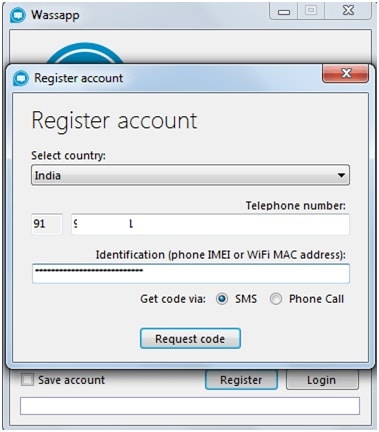
just like any other normal software, after it is done
open the software and register your mobile number
by entering IMEI number as shown in the figure
below:
Once registration is done logged into Wassapp with
your WhatsApp account details and start chatting
with your friends.
Now you can easily install WhatsApp on PC without
BlueStack Software and use . In case you face any
problem during the process let us know by
commenting below.
for anyone and if I am not wrong it will replace
normal SMS application in coming time. WhatsApp is
an Mobile application that requires internet
connection to send and receive messages. Most of
the users want the same facility of WhatsApp on their
Computer as they spend more time on PC and not
texting on Mobile. We can use WhatsApp on
Computer using Bluestacks Software which worked
perfectly fine. The problem I found is Bluestacks
software is too heavy and it causes a lot of problems
in normal working of your system. So here comes the
post showing .
Two ways to install and use WhatsApp on PC
There are two methods that can be used to install
WhatsApp on PC without Bluestacks Software. Since
both of the ways don't use Bluestacks software you
can expect better performance of your system while
texting messages to your friends.
Method No. 1 – Youwave Android on PC
Youwave is a similar software like to Bluestacks that
supports Android 4.0 ICS (Home Version (new)) and
2.3 Gingerbread (Basic Version). Youwave is to use
less system memory and hence offer better
performance. To install and use WhatsApp on PC
without Bluestacks first you need to download and
install Youwave Android on PC Software from here
Then you just need to install WhatsApp by
downloading APK file. See image of working
WhatsApp on YouWave Android on PC Emulator
Method No. 2 - Wassapp Another WhatsApp PC
Client
Wassapp is one more WhatsApp PC Client that
doesn’t requires any Android Emulator like Youwave
or Bluestacks. Download and Install WassApp
Software fromhere
Installation is very simple and
just like any other normal software, after it is done
open the software and register your mobile number
by entering IMEI number as shown in the figure
below:
Once registration is done logged into Wassapp with
your WhatsApp account details and start chatting
with your friends.
Now you can easily install WhatsApp on PC without
BlueStack Software and use . In case you face any
problem during the process let us know by
commenting below.